

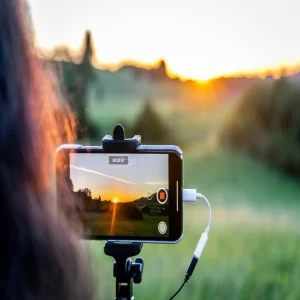
Slow-Motion Video Editing Tutorial
Slow motion is one of the most popular effects in video editing. It makes a video clip play slower than normal speed so that viewers can see details more clearly. For example, if you record a water splash and play it in slow motion, every drop looks dramatic and eye-catching. This effect is widely used in movies, sports highlights, reels, and even school projects.
1. What is Slow Motion?
Slow motion (often written as “slo-mo”) is when a video plays back at a slower speed than it was recorded. Normally, videos are recorded and played at 24 to 30 frames per second (fps). But in slow motion, either more frames are captured or the playback speed is reduced, which makes the action look smooth and slow.
2. Why Use Slow Motion?
- To highlight small details (like water drops, a balloon bursting, or a football kick).
- To create dramatic or emotional scenes in movies.
- To make sports replays easier to watch and understand.
- To add a cool, stylish effect in reels or YouTube shorts.
3. How to Create Slow Motion Videos
Step 1: Record the Video
For best results, record at a high frame rate (like 60 fps, 120 fps, or even 240 fps if your phone/camera supports it). This makes the slow-motion look smooth instead of choppy.
Step 2: Import into Editing App
Open your clip in an editing app. Popular apps for students are CapCut, VN, InShot, Kinemaster, or computer software like Filmora and DaVinci Resolve.
Step 3: Adjust the Speed
Most apps have a “Speed” option. Select your video, then reduce the speed from 1x (normal) to 0.5x, 0.25x, or even 0.1x depending on how slow you want it.
Step 4: Add Effects and Music
To make it look professional, you can:
- Add background music that matches the slow motion.
- Use smooth transitions.
- Apply filters or color correction for a dramatic look.
Step 5: Export the Video
Once you are satisfied, save/export the video in HD (1080p) so it looks clear and good in quality.
4. Tips for Better Slow Motion
- Record in good lighting so the video is bright and clear.
- Use a tripod to avoid shaky footage.
- Always try to shoot at high fps if possible.
- Don’t slow it down too much if your video is recorded in normal fps (30 fps), otherwise it may look blurry or broken.
5. Where Is It Used?
- Movies: For action scenes (explosions, fights).
- Sports: To replay important moments like goals or wickets.
- Social Media: Instagram reels, TikTok, and YouTube shorts often use slow motion for style.
- Education: Science experiments like volcano eruptions or balloon bursts look amazing in slow motion.
Conclusion
Slow motion video editing is simple but powerful. It adds style, emotion, and focus to ordinary clips. All you need is a camera or phone, an editing app, and some creativity. Start experimenting with small clips, like pouring water or running, and practice slowing them down. With time, your videos will look more cinematic and engaging.
In short: Record → Slow Speed → Add Music/Effects → Save. That’s the magic of slow motion!
additionally check it out other post - Easy Steps for Green Screen Video Editing
More from our blog
See all posts

Recent Posts
- How to Add Subtitles and Captions Easily in Your Videos October 14, 2025
- comparison between After Effect and Premiere Pro September 1, 2025
- Slow Motion Video Editing August 28, 2025